 seek
seek

A bulb blows. You take it to the shop, or open a shopping app, and find dozens of bulbs that look almost the same. Screw or push-in? Two pins or two hooks? Warm or cool light? The question is simple: which bulb is this, and which one do I buy?
The answer is mostly in the base, the metal or plastic part that goes into the lamp. The base decides if a bulb fits at all; the shape and the label decide if it looks right. This guide shows how to read all three, and how to use Seek to go from a photo of the old bulb to its name and a place to buy the same one.
Quick answer
Switch off, let the bulb cool, and take it out. Look at the base: threads mean a screw base (E27, E26, E14, E12), two small side pins mean a bayonet (B22, B15), two thick pins with little feet mean GU10, two thin straight pins mean MR16 / GU5.3 or G4, and two small loops mean G9. Then read the label on the bulb for watts, volts and colour. Scan it with Seek, and use Find It to look for where to buy it, the lamp’s manual, or similar items.
A worked example: the kitchen spotlight
One of the small ceiling spotlights in a kitchen goes dark. You twist the old bulb a quarter turn and it drops out. It has two thick pins, each with a small round foot.
You scan it. Seek suggests a GU10 spotlight bulb in the lighting category. The feet on the pins are the clue: that twist-and-lock shape belongs to GU10, which runs on mains power. A bulb with two thin straight pins (MR16) can look very similar from the front but is usually low voltage and needs a transformer, so it will not fit and must not be forced.
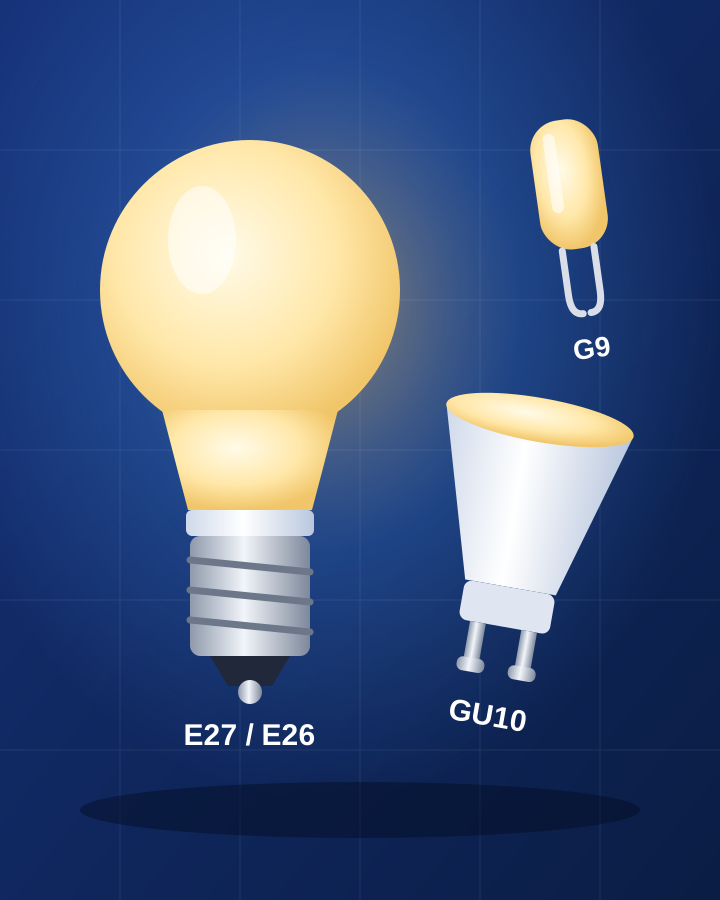
The lights are on a dimmer, so you ask Seek: “Can I use an LED bulb on a dimmer?” The answer: only if the LED bulb says it is dimmable, and some dimmers are made for old bulbs and may make LEDs flicker. Find It then helps you look for where to buy a dimmable GU10, and for similar items. The image at the top of this page is an illustration, not an app screen.
Step by step: from a dead bulb to the right one
- Switch off and let it cool. Turn off the switch, and for a ceiling light, the circuit as well if you are unsure. Halogen and old bulbs get very hot.
- Take it out and look at the base. Screw bulbs turn out; bayonet and GU10 bulbs push in and twist; G9 and G4 capsules pull straight out.
- Scan the bulb with Seek. Hold it against a plain background with the base clearly in the frame. Seek suggests a name, a category and a confidence score. If you are unsure, take a second photo of the empty socket.
- Read the label. Most bulbs show the base code, watts, volts, and on LEDs a colour number like 2700K. On glass bulbs the print is often on the top of the glass or on the metal base.
- Check the lamp. Many lamps have a sticker near the socket with the base type and a maximum watts rating. Do not go over it.
- Use Find It. Look for where to buy the same bulb, the lamp’s manual, or similar items. Search with the base code plus the shape, for example “GU10 dimmable” or “E14 candle”.
Quick reference: bulb bases and how to recognise them
- E27 Standard screw base, 27 mm wide. Most ceiling lights and table lamps outside North America.
- E26 The North American standard screw base, 26 mm wide. Looks almost the same as E27; buy the one sold for your country.
- E14 Small screw base, 14 mm. Candle bulbs, fridge lights, small lamps and chandeliers in Europe.
- E12 Candelabra screw base, 12 mm. Chandeliers and night lights in North America.
- B22 Bayonet: smooth sides with two small pins, push in and twist. Common in the UK, Ireland, India and other countries.
- B15 Small bayonet. Small lamps, cooker hoods and some appliances.
- GU10 Two thick pins with round feet, twist to lock. Mains-voltage spotlights.
- MR16 / GU5.3 Two thin straight pins, push in. Usually 12 V low-voltage spotlights with a transformer.
- G9 Small capsule with two looped pins. Wall lights, small chandeliers, cooker hoods.
- G4 Tiny capsule with two thin straight pins, usually 12 V. Under-cabinet lights, some desk lamps.
- T8 tube (G13) Long thin tube with two pins at each end. Garages, offices, workshops.
- Plug-in compact fluorescent (2D, PL) Bulb on a plastic block with two or four pins. Bathrooms and older ceiling fittings.
Shape, colour and dimming
Once the base is right, three more things make the new bulb look and work like the old one. Shape: pear (often called A60 or A19), candle, golf ball, globe, reflector or spotlight; the code is often printed on the box. Colour: LED bulbs list a number in kelvin. Around 2700K is warm, like old bulbs; around 4000K is neutral white; around 6500K is cool daylight. Mixing them in one room looks odd, so match the old one. Brightness and dimming: compare lumens, not watts, and only use a bulb marked dimmable on a dimmer switch.
Safety
Always switch off before changing a bulb, and never touch the metal inside a socket. If a bulb breaks in the socket, switch off at the fuse box or circuit breaker before you remove the base. Do not use a bulb with higher watts than the lamp allows. Fluorescent tubes and compact fluorescent bulbs contain a small amount of mercury: do not put them in normal rubbish; take them to a recycling point. If the light still does not work with a new bulb, the problem may be the wiring or the fitting, which is a job for an electrician.
Honest limits
Seek names the kind of bulb and base and helps you look for where to buy it, the manual and similar items. Some bases look almost the same in a photo (E26 and E27, or GU10 and some pin types), so read the printed code or check the socket before you buy. A photo cannot tell the voltage of a transformer or if a dimmer works with LEDs. A result can be wrong, and the photo is sent to Seek’s servers to be identified.
For the lamp’s manual, see find a user manual from a photo. For a broken shade ring, holder or other part, see find a spare part from a photo. Changing batteries in a lamp remote or a battery light? See identify a battery type by photo and identify a remote control. For a plug or power adapter, try identify a cable or adapter by photo.
Common questions
How do I know what light bulb I need?
Look at the base of the old bulb: threads, side pins, thick pins with feet, thin pins, or loops. Then read the label for the base code, watts and colour, and check the lamp's maximum watts. Scan the bulb with Seek if you are not sure.
What is the difference between GU10 and MR16?
GU10 has two thick pins with small feet and twists in; it runs on mains power. MR16 (GU5.3) has two thin straight pins and is usually 12 volts with a transformer. They are not interchangeable.
Are E26 and E27 the same?
They are almost the same size, and E26 is the North American standard while E27 is used in most other countries. Buy the base sold for your country and the voltage of your home.
Can I put an LED bulb in an old lamp?
Usually yes, if the base matches. On a dimmer, use a bulb marked dimmable; some old dimmers may still make LEDs flicker.